



Unresolved tickets do more than annoy users. They slow employees, hide recurring system problems, and leave managers guessing who owns the next step. That pressure grows when teams support hybrid users, SaaS access, device sprawl, security tickets, customer commitments, and approval bottlenecks.
At AhelioTech, we treat helpdesk best practices as an operating discipline because 86% of service teams say a help desk system increases their productivity. The goal is faster restoration, cleaner accountability, and better control over risk.
Eric Hullibarger, President of AhelioTech, notes: “A mature helpdesk gives leaders more than a list of open issues. It shows where work is blocked, which systems keep failing, who owns the next action, and whether service commitments are being met. That visibility matters when payroll, customer response, billing, or security access depends on a timely fix.”
Build A Helpdesk Process Your Team Can Trust
Reduce ticket delays, improve ownership, and create clearer escalation paths that keep employees productive and work moving.
IT Helpdesk Best Practices Start With Intake And Ownership
Intake quality determines workload, reporting accuracy, and the employee experience. A vague ticket that says “email is broken” forces a technician to chase details while the sales manager waits for a customer thread before a proposal deadline.
-
Use clear submission paths. Employees and managers need to know where requests go, what belongs in the helpdesk, and when an issue requires another approval path.
-
Require operational context. Required fields should capture business impact, affected system, urgency, location, and user role so technicians prioritize disruption rather than volume.
-
Assign named ownership. Tickets need a clear owner, not just a queue, because help desks resolve about 70% of issues at first contact when routing works.
-
Set update expectations. Status updates reduce follow-up emails, manager escalations, and frustration when employees need to plan around downtime.
| Intake Scenario | Operational Data to Capture | Primary Owner | Likely Handoff or Approval | Failure Mode if Missing |
|---|---|---|---|---|
| New hire cannot access Salesforce on day one | Employee ID, start date, department, manager name, Salesforce profile needed, laptop asset tag | IT service desk analyst | Sales Ops approval for role-based permission set | Generic access granted incorrectly or onboarding delayed while permissions are clarified |
| Warehouse scanner fails during shipping shift | Device serial number, warehouse location, error code, shift time, affected order volume | Endpoint support technician | Facilities or hardware vendor if device replacement is required | Ticket is treated as a single-user device issue instead of a fulfillment-impacting outage |
| Finance user reports blocked access to NetSuite close reports | Report name, period close deadline, user role, screenshot, last successful login time | Business applications support specialist | Finance controller approval for elevated reporting access | Technician resets password while the actual issue is missing reporting permission |
| Executive assistant requests urgent video conferencing fix | Meeting time, room name, conferencing platform, peripheral involved, backup dial-in option | Collaboration tools technician | AV support or office manager if room equipment is faulty | Support arrives after the meeting begins because urgency was not tied to a scheduled event |
| Employee requests access after internal transfer | Old department, new department, effective date, systems to remove, systems to add, manager approval | Identity and access management analyst | HRIS confirmation and application owner approval for sensitive systems | Former permissions remain active, creating audit exposure and segregation-of-duties risk |
IT Help Desk Categories Best Practices For Better Routing
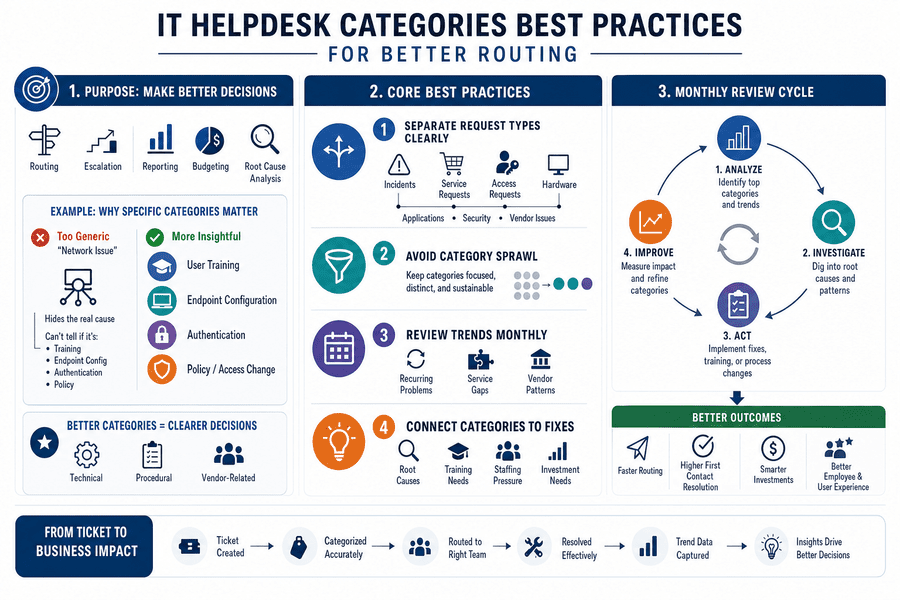
Categories are not just labels. They shape routing, escalation, reporting, budgeting, and recurring issue analysis, so IT help desk category best practices should support decisions rather than create administrative noise.
If VPN tickets spike after a policy change, a generic “network issue” category will not show whether the root problem is user training, endpoint configuration, authentication, or the policy itself. The same applies to recurring Microsoft 365 access requests or printer failures isolated to one department.
-
Separate request types clearly. Use categories for incidents, service requests, access requests, hardware, applications, security, and vendor issues.
-
Avoid category sprawl. Too many categories make reports unreliable and turn trend analysis into cleanup work.
-
Review trends monthly. Leaders need to see recurring problems and service gaps, especially because 80% of support agents say better access to other departments’ data would improve customer service.
-
Connect categories to fixes. Category trends should identify root causes, training needs, staffing pressure, and systems that need investment.
Best Practices For IT Helpdesk Escalation And Approvals
Slow approvals and unclear escalation rules create downtime, compliance gaps, and employee dissatisfaction. When nobody knows who can approve accounting system access, when to engage a software vendor, or when to send a suspicious login for security triage, tickets sit while risk grows.
Disciplined workflows focus on the control points that matter: access approvals, priority-based escalation, vendor handoff, and security incident triage. Because 70% of customers expect any agent or employee they engage with to have full context, escalation rules must preserve ticket notes, affected users, screenshots, asset IDs, and business impact.
The goal is a maintainable workflow that protects continuity. A finance application access request should show the requester, manager approval, role requested, business reason, and retained evidence. A vendor escalation should include the error message, affected users, prior troubleshooting, and the deadline or customer commitment at risk. A suspected security issue should move directly to the right triage path instead of waiting in a general queue.
More Ways To Improve IT Support
IT Helpdesk Best Practices For Service Maturity
Mature helpdesk operations give leaders better control over labor cost, risk exposure, employee productivity, and customer-facing systems. The useful gains show up in specific workflows.
-
Faster restoration of work. Consistent triage gets employees back into systems faster. Priority rules separate a blocked billing user with invoices due today from a low-impact monitor request.
-
Cleaner executive reporting. Reliable ticket data helps leaders see workload, recurring issues, service gaps, and investment needs before leadership meetings become data cleanup exercises.
-
Stronger access control. Documented approvals reduce unauthorized access and support audit readiness by defining who can request access, who approves it, what evidence is retained, and how exceptions are reviewed.
-
Lower support rework. Complete tickets and knowledge articles reduce repeat handling, especially for password resets, shared mailbox access, and line-of-business application errors.
-
Better user confidence. Predictable updates and ownership reduce frustration because users know who is handling the issue and when to expect the next response.
Best Practices In IT Helpdesk Metrics And Continuous Improvement
Changing helpdesk habits affects users, technicians, managers, and approvers, so improvement should start with ticket evidence. Organizations that implement structured help desk practices have seen a 35% improvement in customer satisfaction, reinforcing the value of disciplined intake, routing, ownership, and follow-through.
-
Audit recent ticket history. Review the last 60 to 90 days for repeat issues, missing fields, stale tickets, inconsistent categories, and unclear handoffs.
-
Define priority by impact. Priority levels should reflect business disruption, affected users, customer impact, compliance exposure, and system criticality, not urgency language alone.
-
Set a review rhythm. Open tickets, aging tickets, escalations, and recurring incidents need standing review; teams using stronger support metrics often target 75% to 85% quality scores as a service health benchmark.
-
Refresh knowledge articles. Update articles for high-volume issues because 79% of support agents say an AI copilot helps them deliver better service when the knowledge is accurate, current, and tied to real ticket resolutions.
Tie every change to ticket evidence, workflow reviews, user feedback, or service metrics. If a category review shows repeated NetSuite reporting access issues during close week, the fix is not a broader “application support” label; it is a clearer approval path, better role documentation, and a knowledge article that reflects the actual resolution.
Make Your Helpdesk Easier To Run And Easier To Trust
Stronger helpdesk practices improve visibility, accountability, response consistency, and risk control. They also make daily work easier for the people who depend on IT to keep approvals moving, systems available, devices usable, and customer commitments on track.
If you need help reviewing your current helpdesk process, contact AhelioTech. We can assess ticket intake, categories, escalation paths, approval steps, reporting fields, and communication practices against the way your teams actually work.
Our focus is simplification, maintainable controls, and operational clarity. We help you reduce avoidable rework and build a helpdesk workflow your team can keep using after the review is complete. Contact us today.