



IT support tickets are the backbone of smooth business operations. When managed well, they keep systems stable and employees productive. When handled poorly, they drain time, frustrate teams, and stall essential workflows.
Consider this: Digital friction steals productive hours from 80% of employees, every single month. That’s not just lost time; it’s equally a lost opportunity for innovation and growth.
The difference between chaos and clarity often comes down to three essentials:
-
Clarity: Issues are logged and tracked with precision.
-
Accountability: Ownership is defined, so nothing slips through the cracks.
-
Speed: Problems are resolved before they escalate into downtime.
|
“A well‑structured IT support system creates clarity, accountability, and speed, allowing teams to tackle issues before they escalate.” – Eric Hullibarger, President, AhelioTech |
Proper handling of support tickets transforms IT from reactive firefighting to proactive, strategic support. It keeps teams agile, reduces downtime, and ensures employees stay focused on what matters most.
This guide will walk you through actionable strategies to handle support tickets effectively, turning everyday IT challenges into opportunities for stability and transformation.
How to Categorize Support Tickets
Accurate categorization of support tickets is critical to fast and efficient resolution. Each ticket represents a user issue, but grouping them ensures it reaches the right team immediately.
The most common categories look like this:
-
Incidents: Unexpected disruptions such as network failures or system outages.
-
Service Requests: Routine help like password resets or software installations.
-
Change Requests: Requests to modify systems, such as upgrading software or updating access.
-
Problem Tickets: Recurring or unknown issues requiring investigation.
-
Major Incidents: Critical events demanding immediate attention.
Correct categorization speeds up routing, reduces errors, and makes reporting reliable. It also strengthens analytics, revealing recurring problems or bottlenecks before they escalate.
Practical steps to keep categorization effective:
-
Map categories to real IT needs; avoid overcomplicating with rarely used labels.
-
Train agents on category definitions to ensure consistency.
-
Periodically review categories based on trends and ticket data.
-
Adopt automated ticket routing to reduce response times by up to 40%.
Categorization naturally sets the stage for prioritization, ensuring the right issues get the right level of attention.
How to Prioritize Support Tickets
Prioritization ensures critical issues get attention first while lower‑impact requests wait appropriately. Not every ticket affects operations equally, so ranking is essential.
A simple method works best: urgent, high, medium, low.
-
High Priority: System outages, security alerts, critical data loss.
-
Medium Priority: Non‑urgent application errors or minor bugs.
-
Low Priority: Requests that don’t interrupt workflow, like standard installations.
Flexible systems allow priorities to shift with business impact. Dashboards and automated alerts help managers stay on top of urgent tickets without manual tracking. Visual cues for priority and escalation rules prevent mistakes and improve response times.
Tip: Keep priority rules simple. Overcomplicating levels slows teams and confuses users.
Find Out More About How You Can Make Your Business IT Easier to Manage
How to Answer Support Tickets Effectively
The first response sets the tone. Immediate acknowledgment reassures users and establishes trust. To make every reply count, focus on actions that build confidence and clarity:
-
Confirm understanding: Restate the issue and explain that the ticket is logged and being addressed.
-
Outline actions: Share immediate steps and expected timelines, but avoid overpromising.
-
Communicate clearly: Use user‑friendly language and skip unnecessary technical jargon.
-
Provide transparency: Send regular updates, even if resolution takes time.
-
Record interactions: Document every exchange for reference and future learning.
Well‑handled responses improve satisfaction, reduce follow‑ups, and free IT staff to focus on resolution rather than repeated clarifications.
How to Track Support Tickets
Tracking ensures nothing slips through the cracks. Visibility into open, in‑progress, and resolved tickets keeps teams aligned and prevents issues from being overlooked. The right tools make this possible:
-
Ticketing systems: Dashboards and reporting analytics for visibility.
-
Mobile and cloud solutions: Enable remote or distributed teams to stay aligned.
Beyond tools, tracking is only effective when paired with meaningful metrics. These indicators reveal whether support processes are working or need adjustment:
-
Response times: Measure speed of acknowledgment and resolution.
-
Backlog size: Track workload and prevent bottlenecks.
-
Ticket age: Identify issues that linger too long.
-
Recurring issues: Spot patterns that signal systemic problems.
Proper tracking not only prevents missed tickets but also supports reporting and improvement. Leaders gain insight into workload distribution, team efficiency, and overall service health.
Elevate IT Support and Impress Your Users!
Stop wasting time on invalid tickets and focus on solving critical issues first.
How to Reduce Support Tickets
Proactive measures lighten IT workload and improve response for critical issues. Instead of waiting for problems to pile up, organizations can empower employees and stabilize systems through simple, preventive steps:
-
Train employees: Zendesk reports 67% prefer self-service over talking to support. Provide guides or FAQs so staff can resolve common issues themselves.
-
Offer self‑service portals: Enable routine request
‘s like password resets without IT intervention. -
Schedule system updates: Prevent recurring problems by keeping software and hardware current.
-
Perform preventive maintenance: Reduce avoidable disruptions before they impact operations.
With fewer tickets, IT staff can focus on high‑impact problems. Employees gain faster responses and learn to resolve minor issues independently, boosting overall efficiency.
How to Reduce Invalid Technical Support Tickets
Invalid tickets waste time and distract IT staff from real issues. The key is to set clear boundaries and introduce checks that filter out unnecessary requests before they reach the queue:
-
Set submission guidelines: Ensure employees know what qualifies as a support ticket.
-
Introduce validation steps: Review tickets before full processing to confirm relevance.
-
Use automation or AI tools: Filter repetitive or simple requests automatically. Automating help desk ticket resolution lets 22% of tickets get resolved at virtually no extra cost.
This approach ensures IT resources stay focused on genuine problems, improving overall team performance and reducing frustration across the organization.
What Are Some of the Most Common Trouble Tickets IT Support Faces?
Recurring tickets are predictable and manageable when clear workflows exist. By recognizing the issues that appear most often, IT teams can prepare solutions in advance and reduce resolution time.
Examples of frequent support tickets include:
-
Password resets: Automate or provide self‑service options.
-
System outages: Begin with immediate troubleshooting, then follow with root cause analysis.
-
Hardware failures: Resolve remotely when possible or arrange replacements.
-
Software installations: Offer step‑by‑step guidance or automated deployment.
-
Slow systems: Identify resource bottlenecks and optimize performance.
-
Access permissions: Adjust user roles promptly to maintain security.
-
Security alerts: Run scans and patch vulnerabilities quickly.
Creating templates and workflows for these recurring tickets reduces errors and empowers users through self‑service, decreasing overall ticket volume.
Pulling It All Together for Efficient IT Support
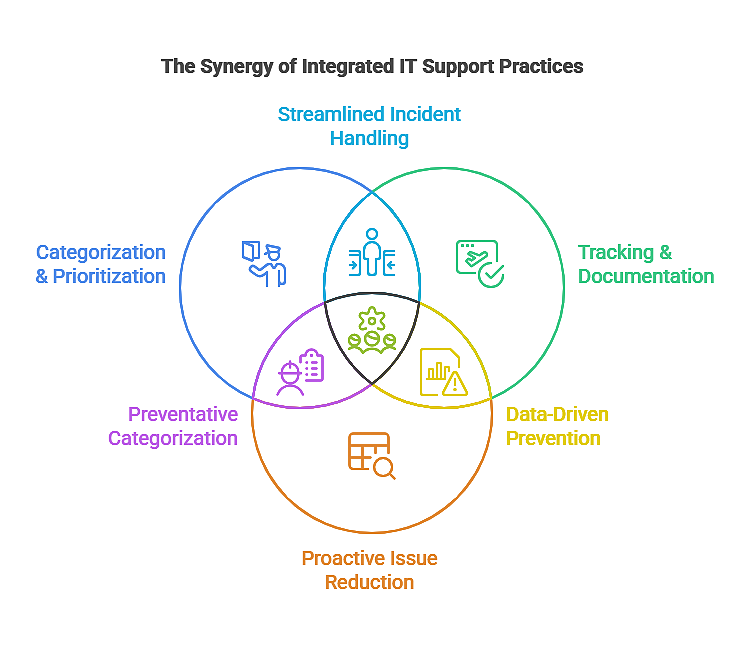
Efficiency comes from integration. When categorization, prioritization, tracking, and proactive reduction are combined into a single workflow, IT support shifts from reactive problem‑solving to strategic enablement.
Key practices to unify support processes:
-
Empower teams with robust ticketing systems.
-
Encourage consistent documentation and communication.
-
Monitor trends to anticipate and prevent issues.
-
Continuously review metrics to drive service improvement.
This integrated approach benefits users, IT staff, and business operations alike. Efficiency rises, frustration falls, and IT becomes a true strategic enabler.
Final Tips and Takeaways
Sustainable IT support depends on simplicity and consistency. Complex workflows slow teams down, while clear processes build confidence.
Practical reminders for long‑term success:
-
Keep categorization and workflows simple.
-
Provide clear guidelines and training for staff.
-
Encourage feedback loops for continual improvement.
-
Review metrics regularly to spot patterns and refine processes.
Small adjustments yield big gains. Handling support tickets effectively empowers your IT team and elevates overall business productivity.
Common IT Support Ticket Patterns and Resolution Tools
Recurring support tickets often follow predictable patterns. By recognizing these trends and pairing them with the right tools, IT managers can cut response times, reduce workload, and improve overall service quality.
The table below highlights common ticket types, their frequency, and practical tools that streamline resolution:
|
Ticket Type |
Frequency |
Recommended Tool / Action |
Impact on IT Workflow |
|
Password Resets |
High |
High |
Reduces manual handling |
|
System Outages |
Medium |
Cloud monitoring, instant alerts |
Ensures faster resolution |
|
Software Installations |
Medium |
Automated deployment tools |
Reduces IT intervention |
|
Hardware Failures |
Low |
Remote diagnostics, spare inventory |
Limits downtime |
|
Security Alerts |
Low |
Patch management software, automated scans |
Protects systems proactively |
This quick reference shows how routine issues can be handled more efficiently when paired with automation and monitoring. By embedding these tools into daily workflows, IT teams spend less time on repetitive tasks and more time on strategic initiatives.
Partner with AhelioTech for Expert IT Support
Handling support tickets effectively transforms your IT workflow. When categorization, clear responses, tracking, and proactive reduction come together, IT shifts from firefighting to strategic enablement.
Work With Some of Ohio’s Top IT Support Specialists
With AhelioTech, you gain:
-
18 years of experience delivering trusted IT support.
-
CISSP‑certified technicians ensuring systems remain secure and efficient.
-
Proactive strategies that reduce workload and improve response times.
-
Streamlined operations that keep employees focused and productive.
Contact us today to schedule a consultation. Let the team help you handle tickets like a pro and elevate your IT support into a true business advantage.